Originally posted on December 31, 2018 @ 00:54
The unparalleled Map Manager stands as the ultimate utility to comprehensively understand and manipulate image maps employed within your scene. Far transcending the limitations of a rudimentary script, it encompasses an array of meticulously crafted scripts spanning diverse domains, synergistically amalgamated to expedite your creative journey with unparalleled swiftness and efficiency.
This all-encompassing solution encompasses image map management, leveraging specialized interfaces to precisely pinpoint mapped attributes and seamlessly transfer maps between surfaces, encompassing any surface property (for instance, Base Color, Bump Strength, Normal Map, and more) to the same or any other surface attribute. Furthermore, it incorporates a comprehensive suite of analysis tools, baking tools, and mechanisms to meticulously preserve and restore the original map - and unmapped - state for any selection and specific surface properties you desire.
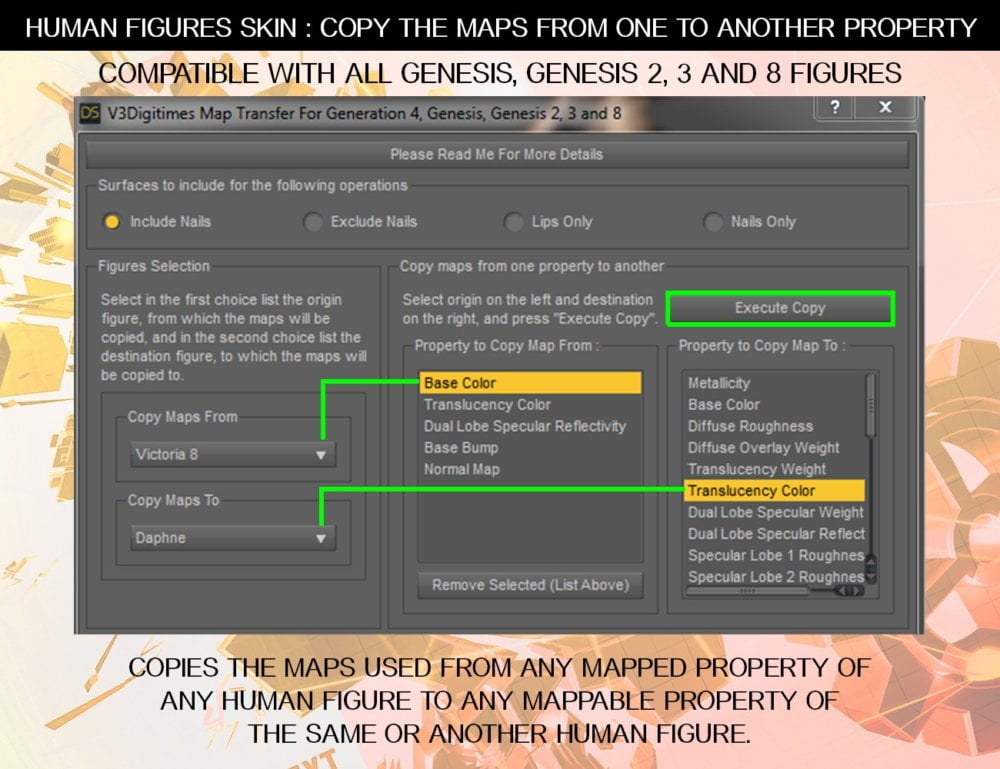
Map Management Tools for Human Figures : Two scripts dedicated to human figures compatible with Generation 4 (Michael 4, Victoria 4) and with all Genesis generations (Genesis, Genesis 2, 3, 8, 8.1 and 9) allow you to see what are the mapped properties of the skin of the selected figures, and to either unmap them, or to copy the image maps used from any mapped property (Base Color, Bump Strength, Glossy Layered Weight, etc, etc) of a figure to any mappable property of the same or any another figure. The first script allows the map copy from a figure to another, and the second other script allows the map copy or removal only on the same figure but can process simultaneously several figures.
The fields of application of these scripts are wide. Do you want to use the Base Color maps of a figure as the translucency maps of another one? A single click in The Human Figure Map Transfer and this is done. Do you have a figure you love but which comes without the great details coming from the normal maps? Pick up the normal maps of another figure! Do you love everything in your figure except its gloss repartition? Pick up the Gloss maps of another figure! Do you need to use the Bump map as the Top Coat Bump of one or several figures in a scene? Just copy all of them in one single click! Do you want to turn your figures into strange alien creatures using the Normal Maps as its Base Color or Translucency Color Maps? Once again this can be done with a single click.
Map Management Tools for any surface: A dedicated script is included to work on any selected surfaces. You can the same way see what are the mapped properties of any surface, unmap the property you want, and copy the map for this property to any other mappable property of any same or other surfaces. You can preview the maps, and batch tools have been included as options in the interface so that if you want you can process all the selected surfaces simultaneously in a single click.
Map Analysis Tools: For any selection, you make, get a synthesis of what are the maps used and what are the mapped properties, figure by figure or map by map. Get the result directly in Daz Studio interface with a synthetic table displaying previews of images with the details of where they are used, or get the result in a CSV file which you can open in a table editor so that you can sort the columns you want to get the information you want.
Map Baking Tool: Find a one-click LIE baker to gain time when opening scenes, and to transfer more easily the resulting maps from one figure or prop to another figure or prop.
Map Store and restore Tools: don't be afraid to remove or copy maps, and don't be afraid to test and innovate because you can store and restore the map state of any selection whenever you want! Even better, you can restore either everything or only the exact mapped properties that you want to restore.
Map manager is compatible with all shaders and render engines and complete documentation is provided to get the best out of these tools.
V3DMM 01 Use In Case Of Layered Images
V3DMM 02 Store Selection Texture Map State
V3DMM 03 Restore Selection Texture Map State
V3DMM 04 Any Surface Map Manager
V3DMM 05 Human Figures Self Map Manager
V3DMM 06 Human Figures Map Transfer
V3DMM 07 Create CSV File
V3DMM 08 Summary Of Texture Maps
Map Manager User Guide (.PDF)