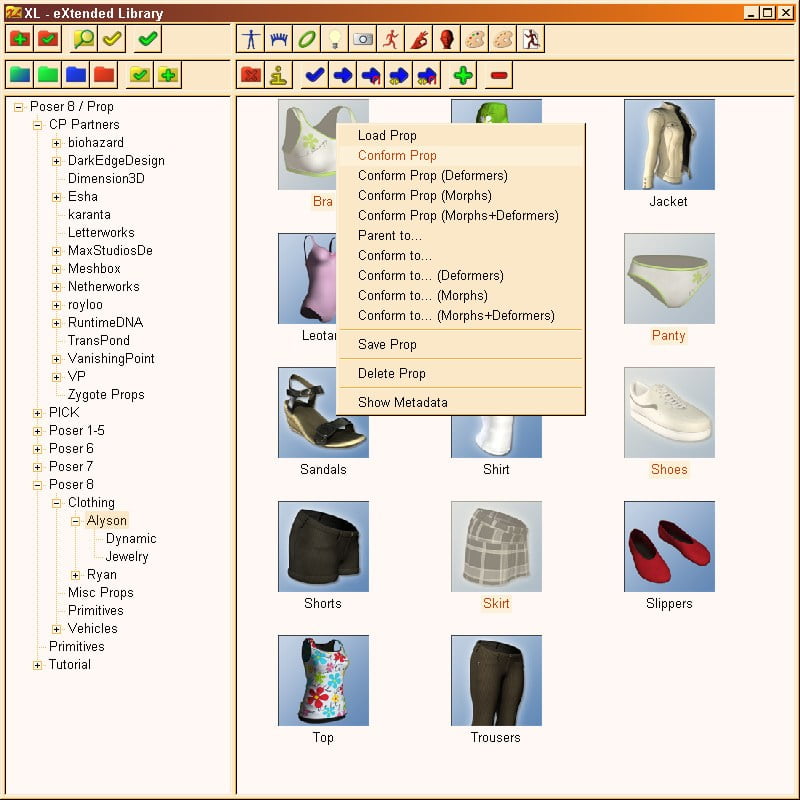
eXtended library system for Poser 8 and up written in Poser Python. It gives you full access to your Poser content and has several advanced features to improve your workflow. The XL window can stay open while you are working with Poser, you can minimize it to be out of the way while you don't need the library.
With its separate folder tree and file list, XL is easy and quick to navigate. You can load and save all kinds of Poser content based on the well-known library structure with figures, props, poses, materials and so on. The tree displays a single library type for a single runtime to prevent too large and confusing structures. Switching between runtimes and libraries is done by selecting either one or both of them. By defining your own favorite folders, you can quickly switch to the folders you use most often. Cross-links can be defined to link related content folders, e.g. a clothing figure and its materials. The search feature allows to search for content in one or several runtimes.
The most important use of a content library is to load content. With XL, you can select several files in a folder and load them at once, e.g. different parts of a prop set or several clothing items of an outfit. For conforming clothes, they can be directly conformed to the selected figure in the scene, optionally also together with adding deformers (magnetize) and setting morph values, to make the clothes fit immediately.
For all kinds of poses as well as for material collections, it's possible to select the target object in the scene in the library, so you don't have to switch between the scene preview and the library when working with several figures. Single materials can be assigned in the pose room, by selecting one or several materials from the current figure or prop.
Note: Due to limitations in Poser Python, there are less options when saving content to the library.
Note: Only PNG thumbnails are shown, no RSR thumbnails.
Features:
Quick and easy to navigate library system for Poser 8, Poser Pro 2010, Poser 9, and Poser Pro 2012
Separate folder tree and file list, both with context menus
Horizontal or vertical split between folder tree and file list
Optionally include folders in file list
Define your own favorite folders and cross-links for quick access
Menu to select figure, object, or material in scene
Load and save any kind of Poser content
Import DAZ Studio content (requires DSON Importer for Poser; works without Poser companion files)
Advanced features to load content:
Load / apply several files at once
Conform loaded figures directly to the selected figure in the scene
Optionally add deformers (magnetize) when loading conforming clothes
Optionally set morph values as in figure when loading conforming clothes
Select target for conforming figures, parented props, poses, hands, expressions, and material collections in library
Select one or several materials of current object in library when loading single materials
Advanced save for pose with selection of actors and parameter types
Search in runtime folders
Show metadata
Selectable thumbnail size from 16x16 to 256x256 (default: 91x91)
Manual included
Documentation: Read Me | | License | Product Brochure
Categories: Plugins & Scripts
Software: Poser 8, Poser Pro 2010, Poser 9, Poser Pro 2012