Get all your Genesis 8 to Genesis 9 characters converted in one amazing package! This bundle combines RSSY Character Converters for Genesis 8 and 8.1 Males and Females to Genesis 9 and both RSSY Genesis 8 and 8.1 Male and Female Material Suits.
- RSSY Genesis 8 and 8.1 Female Material Suit for Genesis 9
Updated 2023-05-31 Issue fixed with the anatomical elements causing Daz Studio to crash when morphs were dialed into G9
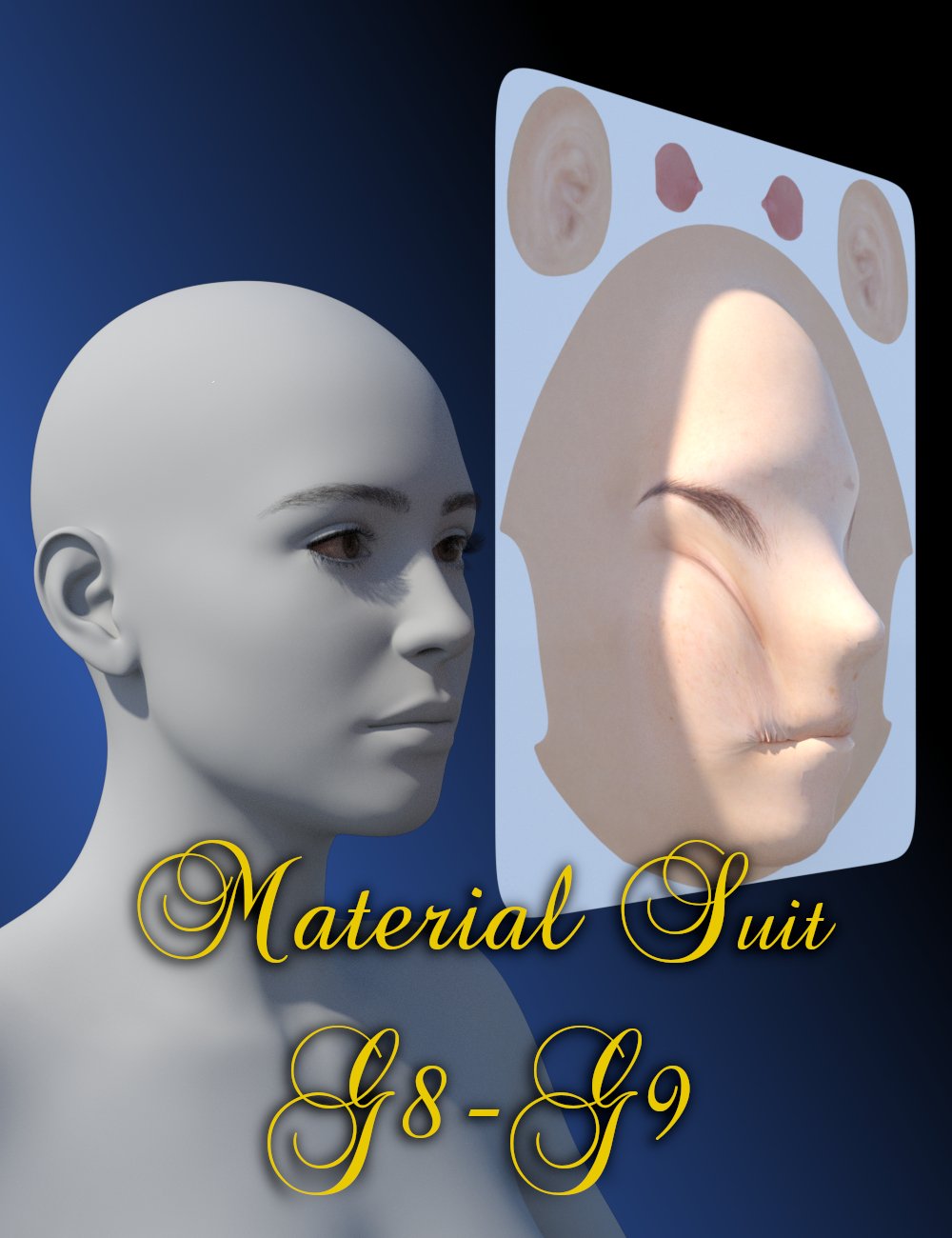
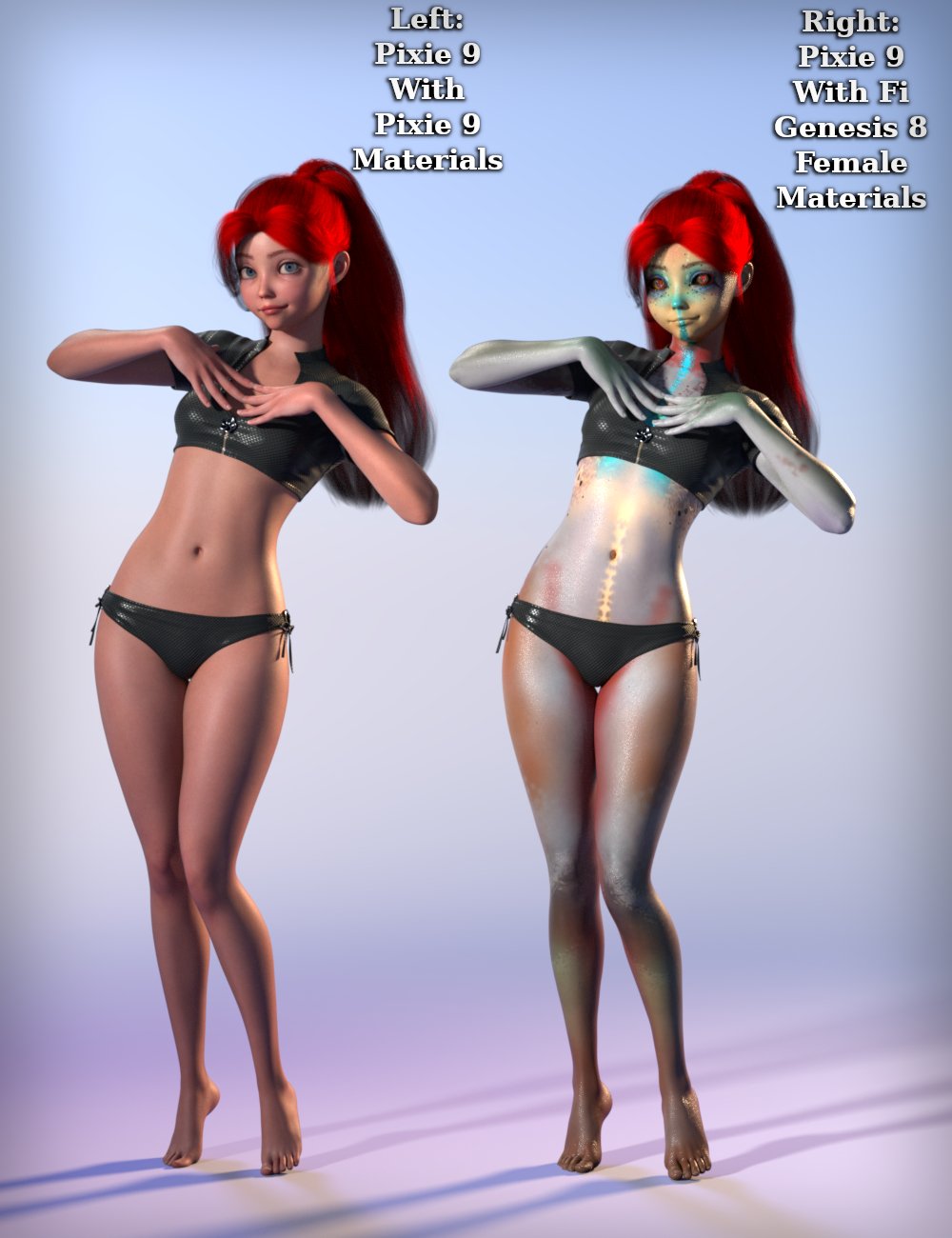
Convert your favorite Genesis 8 characters to Genesis 9 characters! The Material Suit from Genesis 8 Female to Genesis 9 scripts allow you to quickly and easily use Genesis 8 character textures on Genesis 9. The Material Suit scripts provide easy one-click execution for automatically applying hierarchical materials presets. If you select the individual Material Suit, or the Eye, Mouth, or Eyelash conformer, you can separately apply materials to those too! Selecting Material Suit also allows you to apply geometry shells to it and have them look great!
The Material Suit script is extremely simple to use. Just select the characters to convert, select a hierarchical material preset in Smart Content or Content Library, and click the “Material Suit Apply G8-G9 Hierarchical Material” preset. There is also a preset to add a custom action for this preset to your Scripts heading in your interface for even faster and easier use.
The Material Suit script cannot properly convert all Genesis 8 materials. It can’t be used to put Genesis 8 geometry shells over a Genesis 9 skin because the Material Suit is a culling conformer that removes all Genesis 9 geometry under it. You have to put the Material Suit on and then the geoshell (same with LIE materials). It also cannot show HD morphs because it is a conformer. The exception is the default nipple and navel HD morphs, which are included in the suits.
Use Genesis 8 and 8.1 character skins on Genesis 9
Use Genesis 8 skins on Genesis 9 morphs
No more ugly seams using Genesis 8 skins on Genesis 9RSSY Genesis 8 and 8.1 Female Material Suit for Genesis 9: (.DUF)
Scripts:
Material Suit Add G8.1F Material Suit
Material Suit Add G8F Material Suit
Material Suit Apply G8-G9 Hierarchical Material
Material Suit Install Custom Actions
Material Suit User Manual
Wearables:
RSSY 01 G8.1F Full Setup Anat Elem Fem
RSSY 01 G8.1F Full Setup Anat Elem Masc
RSSY 01 G8.1F Full Setup No Anatomical Elements
RSSY 01 G8F Full Setup Anat Elem Fem
RSSY 01 G8F Full Setup No Anatomical Elements
RSSY Genesis 8 Eye Suit
RSSY Genesis 8 Eyelash Suit
RSSY Genesis 8 Female Body Suit
RSSY Genesis 8 Mouth Suit
RSSY Genesis 8.1 Eye Suit
RSSY Genesis 8.1 Eyelash Suit
RSSY Genesis 8.1 Female Body Suit
Download via QtyFiles Service - RSSY Character Converter Genesis 8 and 8.1 Male to Genesis 9

Updated 2023-06-09:
Modified GetMorphType function to check an array of prefixes for matching the head or body morph names (now supports morph names that start with FHM *or* Head to identify the morph as a head)
Fixed bug thrown by DoCharacterDialog because of copy/paste error (this.sWhatsThis) in v1.0.1Updated 2023-06-01:
Added user options for Transfer Utility settings to improve morphs
Added Distance Tolerance option
Added Adaptive Tolerance option
Fixed ExecuteScript to NOT do an IncludeFile call
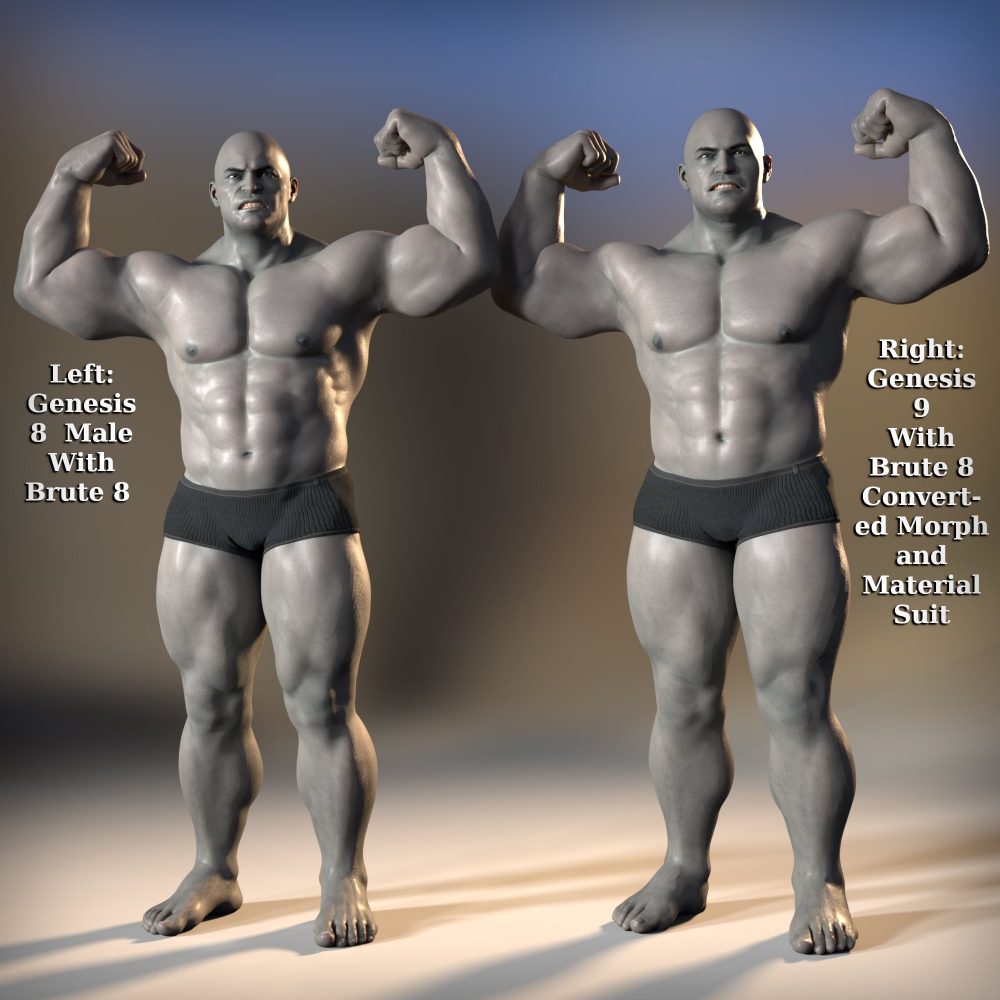
Fixed bug in LoadMaterialSuits function where calling IncludeFile twice was messing up on the macConvert your favorite Genesis 8 characters to Genesis 9 characters! The Character Converter from Genesis 8 Male to Genesis 9 scripts transfer the morphs from beloved Genesis 8 characters to the next generation, Genesis 9. The Character Converter scripts provide easy batch execution for automatically converting your Genesis 8 character to a Genesis 9 character in your library. Even better, icons, categories, and the default materials* are copied from your original Genesis 8 character to the new Genesis 9 character.
The Character Converter script is extremely simple to use. Just select the characters to convert and click execute! There is also a Convert Scene Character script, which will copy a Genesis 8 character in the scene, with all currently used morphs, to a Genesis 9 character.
The Character Converter script cannot properly convert all Genesis 8 characters. Characters with extreme morphs may have problems, especially around the eyes.** Multi-part characters (e.g., a character that loads a figure and separate horns) cannot be converted. Material presets are also not converted. Default materials copied to your new Genesis 9 characters may have ugly seams and/or misaligned features due to the different UV layout.* Items without metadata can be converted but will not show up in Smart Content. They may also need to be converted using a Force Convert Item(s) button.
Features
Convert Genesis 8 Characters to Genesis 9 Characters!
Unprecedented control over the eye area — use a special option included to scale and place the eyes of big-eyed characters like Girl 8, or let it run automatically for normal-sized heads and eyes like Victoria 8!
Mix morphs in your scene to create entirely new characters and then convert them to Genesis 9 characters
Automatically copy a currently installed Genesis 9 Hierarchical Map to the new Genesis 9 characters
Copies icons from the Genesis 8 character to the Genesis 9 character for a professional look
Automatically convert almost your entire library of characters with one operation!
Supports the Material Suit line of products! Copy Genesis 8 materials to the new Genesis 9 characters without ugly seams*
Supports the Turbo Loader line of products! Convert your library of characters as fast as possible by turning off all the morphs for Genesis 8. If Turbo Loader is installed, the Character Converter script will enable only the morphs used by the Character Preset, convert the character, and then disable the morphs again
* The Material Suit product is needed to properly copy the materials from Genesis 8 to Genesis 9.** A Character Converter Eye Placement script can be automatically invoked to help you manually scale and move the eyes for extreme eyes such as Girl 8.
RSSY Character Converter G8M and G8.1M to G9
Character Converter Eye Placement
Character Converter G8M to G9
Character Converter G9 User Manual
Character Converter Install Custom Actions
Convert Custom Character G8M to G9
Download via QtyFiles Service - RSSY Character Converter Genesis 8 and 8.1 Female to Genesis 9

Updated 2023-06-09:
Modified GetMorphType function to check an array of prefixes for matching the head or body morph names (now supports morph names that start with FHM *or* Head to identify the morph as a head)
Fixed bug thrown by DoCharacterDialog because of copy/paste error (this.sWhatsThis) in v1.0.1Updated 2023-06-01:
Added user options for Transfer Utility settings to improve morphs
Added Distance Tolerance option
Added Adaptive Tolerance option
Fixed ExecuteScript to NOT do an IncludeFile call
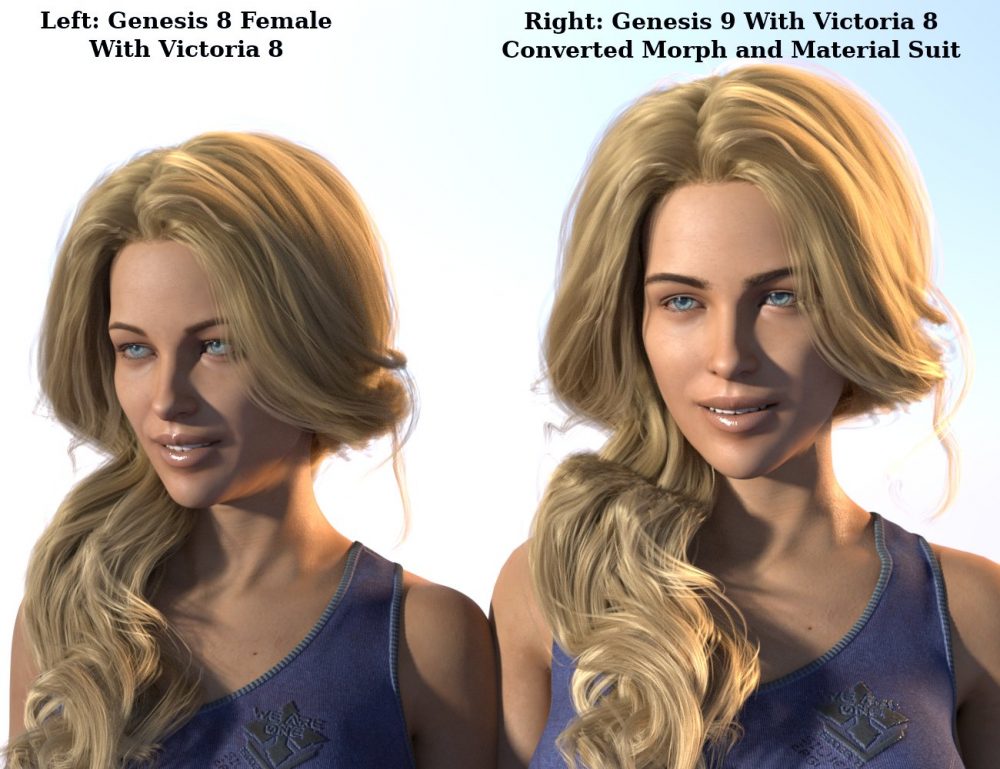
Fixed bug in LoadMaterialSuits function where calling IncludeFile twice was messing up on the macConvert your favorite Genesis 8 characters to Genesis 9 characters! The Character Converter from Genesis 8 Female to Genesis 9 scripts transfer the morphs from beloved Genesis 8 characters to the next generation, Genesis 9. The Character Converter scripts provide easy batch execution for automatically converting your Genesis 8 character to a Genesis 9 character in your library. Even better, icons, categories, and the default materials* are copied from your original Genesis 8 character to the new Genesis 9 character.
The Character Converter script is extremely simple to use. Just select the characters to convert and click execute! There is also a Convert Scene Character script, which will copy a Genesis 8 character in the scene, with all currently used morphs, to a Genesis 9 character.
The Character Converter script cannot properly convert all Genesis 8 characters. Characters with extreme morphs may have problems, especially around the eyes.** Multi-part characters (e.g. a character that loads a figure and separate horns) cannot be converted. Material presets are also not converted. Default materials copied to your new Genesis 9 characters may have ugly seams and/or misaligned features due to the different UV layout.* Items without metadata can be converted but will not show up in Smart Content. They may also need to be converted using a Force Convert Item(s) button.
Features
Convert Genesis 8 characters to Genesis 9 characters!
Unprecedented control over the eye area — use a special option included to scale and place the eyes of big-eyed characters like Girl 8, or let it run automatically for normal-sized heads and eyes like Victoria 8!
Mix morphs in your scene to create entirely new characters and then convert them to new Genesis 9 characters
Automatically copy a currently installed Genesis 9 Hierarchical Map to the new Genesis 9 characters
Copies icons from the Genesis 8 character to the Genesis 9 character for a professional look
Automatically convert almost your entire library of characters with one operation!
Supports the Material Suit line of products! Copy Genesis 8 materials to the new Genesis 9 characters without ugly seams*
Supports the Turbo Loader line of products! Convert your library of characters as fast as possible by turning off all the morphs for Genesis 8. If Turbo Loader is installed, the Character Converter script will enable only the morphs used by the Character Preset, convert the character, and then disable the morphs again
* The Material Suit product is needed to properly copy the materials from Genesis 8 to Genesis 9.** A Character Converter Eye Placement script can be automatically invoked to help you manually scale and move the eyes for extreme eyes such as Girl 8.
RSSY Character Converter Genesis 8 and 8.1 Female to Genesis 9 (.DSA and .DSE)
Character Converter Eye Placement
Character Converter G8F to G9
Character Converter G9 User Manual
Character Converter Install Custom Actions
Convert Custom Character G8F to G9
Download via QtyFiles Service - RSSY Genesis 8 and 8.1 Male Material Suit for Genesis 9


Updated 2023-06-15 Fixes issue with right eye rigidity not matching left on G8 Eye Suit, Changes Male Suit to male Body suit in DUF Name
Updated 2023-05-31 Issue fixed with the male anatomical elements causing Daz Studio to crash when morphs were dialed into G9
Convert your favorite Genesis 8 characters to Genesis 9 characters! The Material Suit from Genesis 8 Male to Genesis 9 scripts allow you to quickly and easily use Genesis 8 character textures on Genesis 9. The Material Suit scripts provide easy one-click execution for automatically applying hierarchical materials presets. If you select the individual Material Suit, or the Eye, Mouth, or Eyelash conformer, you can separately apply materials to those too! Selecting Material Suit also allows you to apply geometry shells to it and have them look great!
The Material Suit script is extremely simple to use. Just select the characters to convert, select a hierarchical material preset in Smart Content or Content Library, and click the “JMaterial Suit Apply G8-G9 Hierarchical Material” preset. There is also a preset to add a custom action for this preset to your Scripts heading in your interface for even faster and easier use.
The Material Suit script cannot properly convert all Genesis 8 materials. It can’t be used to put Genesis 8 geometry shells over a Genesis 9 skin because the Material Suit is a culling conformer that removes all Genesis 9 geometry under it. You have to put the Material Suit on and then the geoshell (same with LIE materials). It also cannot show HD morphs because it is a conformer. The exception is the default nipple and navel HD morphs, which are included in the suits.
Use Genesis 8 and 8.1 character skins on Genesis 9
Use Genesis 8 skins on Genesis 9 morphs
No more ugly seams using Genesis 8 skins on Genesis 9RSSY Genesis 8 and 8.1 Male Material Suit for Genesis 9: (.DUF)
Scripts:
Material Suit Add G8.1M Material Suit
Material Suit Add G8M Material Suit
Material Suit Apply G8-G9 Hierarchical Material
Material Suit Install Custom Actions
Material Suit User Manual
Wearables:
RSSY 01 G8.1M Full Setup Anat Elem Fem
RSSY 01 G8.1M Full Setup Anat Elem Masc
RSSY 01 G8.1M Full Setup No Anatomical Elements
RSSY 01 G8M Full Setup Anat Elem Fem
RSSY 01 G8M Full Setup No Anatomical Elements
RSSY Genesis 8 Eye Suit
RSSY Genesis 8 Eyelash Suit
RSSY Genesis 8 Male Body Suit
RSSY Genesis 8 Mouth Suit
RSSY Genesis 8.1 Eye Suit
RSSY Genesis 8.1 Eyelash Suit
RSSY Genesis 8.1 Male Body Suit
Download via QtyFiles Service